Asterisk · Guide
Set up an Asterisk softphone on iPhone
Connect a modern Asterisk PJSIP extension to Callmar, verify two-way audio and make incoming calls reach the iPhone lock screen.
Updated for Callmar 1.4 ·
What you need before starting
Collect these values from your Asterisk administrator before you open the Callmar form:
- SIP server — the host phones use, such as
pbx.company.com. Not the admin web address. - Username and password — the SIP login for the extension. The username is often the extension number, but it does not have to be.
- Port and transport — usually UDP, TCP or TLS, with the port that Asterisk is actually listening on.
- Media encryption — whether this endpoint expects SRTP. Leave SRTP off in Callmar unless the administrator says to enable it.
- Network path — whether the PBX is reachable from outside the office, or only over VPN / office Wi-Fi.
Callmar has one Username field and uses it for both SIP identity and authentication. If your Asterisk setup requires two different values for those roles, ask the administrator whether a single compatible login can be provided.
For the PBX side, use the official Asterisk PJSIP configuration guide. Callmar does not ask you to rewrite the dialplan. Current Asterisk uses res_pjsip; the older chan_sip driver was removed starting with Asterisk 21.
How Asterisk PJSIP maps to the iPhone form
An Asterisk PJSIP extension is made from several related objects. The endpoint controls call behaviour and media, auth verifies the password, and the address of record (AOR) stores one or more live contacts created by registration. A transport listens for UDP, TCP or TLS traffic. Finally, dialplan context and routes decide where the extension may call.
| Asterisk side | Callmar field or test |
|---|---|
| Registrar host and listening transport | Server, Port and Transport |
auth username and password | Username and Password |
| Endpoint media encryption | SRTP Encryption |
| AOR contact created by REGISTER | Registered status and connection path |
| Dialplan context and outbound route | Successful outgoing test to an allowed destination |
| Dial target, ring group or inbound route | Incoming test to the extension |
The endpoint, auth and AOR often share a label such as the extension number, but Asterisk does not require their names or user values to be identical. Callmar has one Username field, so confirm that the configured authentication model can use one value. A green REGISTER proves the auth and AOR path; it does not prove the dialplan or RTP path.
Asterisk’s official PJSIP object guide explains these relationships in detail.
Prepare the Asterisk extension
A useful mobile extension needs four things on the PBX:
- An endpoint with authentication and an address-of-record that allows registration.
- A transport listening on the host and port you will enter in Callmar.
- An incoming route or dial target that rings this extension.
- An outgoing context that allows the numbers you need to call.
If a desk phone already uses the same credentials, ask whether the address-of-record allows more than one contact. Asterisk rejects a second registration with 403 when max_contacts is too low. Increasing the limit keeps several contacts; remove_existing instead lets a new registration replace an older one. Choose deliberately: replacing the contact can make the desk phone stop ringing. A separate mobile extension is often clearer to manage.
If the PBX is reachable only over a company VPN, Callmar may work while that VPN and the app are active, but the background relay cannot reach a private server that stays hidden inside the LAN. The official PJSIP troubleshooting guide documents the AOR and contact-limit failure messages.
Check public reachability, firewall and NAT
A mobile softphone must reach Asterisk from networks that are outside the office. Prefer a stable SIP FQDN, controlled firewall policy and a documented TLS endpoint or VPN design. Do not expose UDP 5060 and the entire RTP range to every source simply to make one test pass.
For a PBX behind NAT, the administrator should verify the external signalling and media addresses, local-network definitions and endpoint NAT behaviour. In res_pjsip, settings such as rewrite_contact, force_rport and rtp_symmetric are relevant in common NAT designs, but they are not universal switches. Apply the values that match the actual topology and capture a SIP/RTP trace before changing them.
Test DNS and the chosen transport from both office Wi-Fi and cellular data. If registration works only inside the LAN, the public host, firewall or NAT mapping is incomplete. If direct registration works over VPN but locked-screen relay mode does not, the remaining issue is that the relay has no route into the private network.
Add Asterisk to Callmar
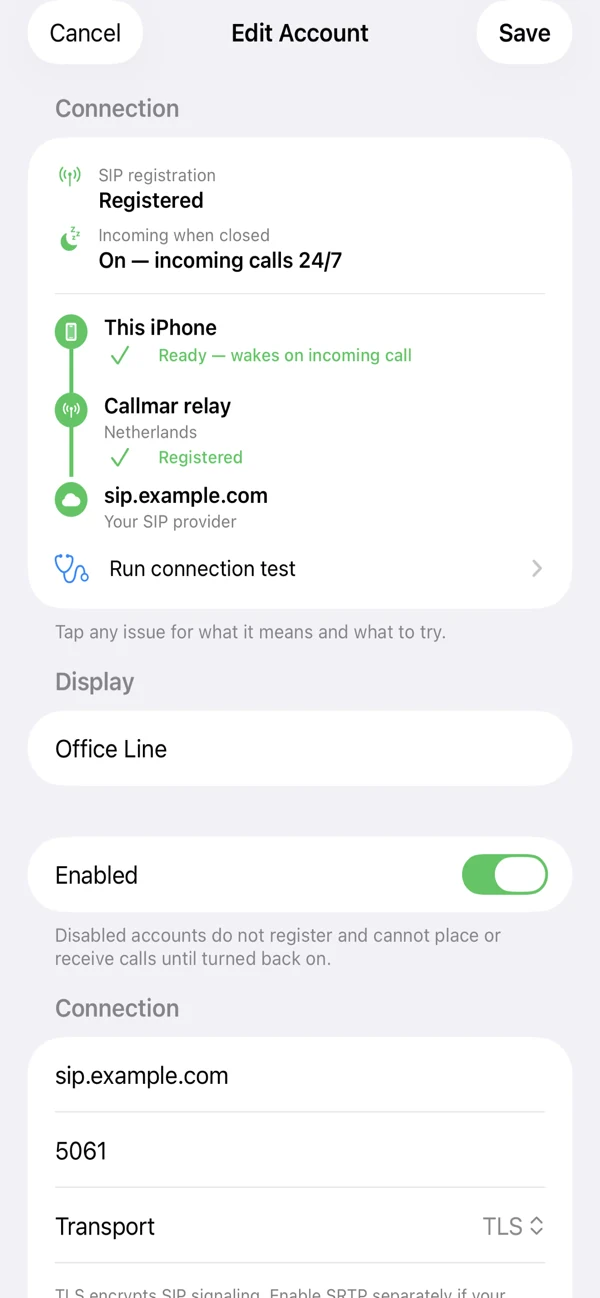
- Open Accounts, tap Add Account and choose Asterisk / FreePBX or Custom / Other.
- Enter a clear name such as Office or Support.
- Fill in Server, Port, Username and Password from the administrator. The Asterisk / FreePBX preset starts on UDP port 5060 with SRTP off; change those values if your PBX uses something else.
- Set Transport to UDP, TCP or TLS to match Asterisk. Turn on SRTP Encryption only when the endpoint expects encrypted media.
- Keep Use Callmar push relay on for lock-screen incoming calls, choose a relay region, tap Save and wait for Registered status.
Do not put http://, an admin-panel URL or a web path in the Server field. Use the SIP host name Asterisk advertises for phones.
For the general account form and status meanings, see the SIP softphone for iPhone guide. FreePBX users can follow the FreePBX softphone guide instead when the PBX is managed through that GUI.
Incoming calls and the lock screen
With the push relay on, Callmar keeps the SIP registration reachable so an incoming call can wake the iPhone and show the native CallKit screen, including when the app is in the background or closed. Live conversation audio still follows the route chosen by your Asterisk system, SBC or SIP provider.
If push relay is off, Callmar registers directly with the Asterisk host and can receive calls only while the app is running. That mode is useful for a controlled office test, but it is not the everyday mobile setup.
After you manually force-quit Callmar, reopen it once before expecting incoming notifications again. Also confirm that iOS allows notifications for Callmar.
Verify the line before relying on it
Registration means Asterisk accepted the login. It does not prove that every route and media path works. Run these checks in order:
- Registration: Callmar shows the extension as Registered.
- Outgoing: call a known number and confirm two-way audio.
- Incoming with the app open: dial the DID or internal route that should ring this extension.
- Incoming with the phone locked: close Callmar, lock the iPhone and repeat the incoming test.
Change one setting at a time if a step fails. Mixing several transport, encryption and firewall changes makes the next test harder to read.
If this extension will replace a desk phone workflow, also test the functions people actually depend on: DTMF against an IVR, hold, voicemail access and one transfer. Callmar uses SIP REFER for standard blind transfer and can play an administrator-supplied DTMF transfer code when the PBX uses that instead. Confirm the feature code in Asterisk; do not assume a generic *2 sequence matches the installed dialplan.
Keep the connection secure
Remote SIP access needs careful PBX and network policy. Prefer strong extension passwords, controlled firewall access and monitoring rather than leaving SIP open to the whole internet.
TLS encrypts SIP signalling. Callmar needs a certificate that matches the host name you enter and chains to a public certificate authority. An IP address may reach the PBX and still fail TLS validation when the certificate was issued for a domain name.
SRTP encrypts call media and is a separate switch from TLS. Asterisk documents that SDES SRTP should be paired with encrypted SIP signalling so media keys are not exposed in clear SDP. In Callmar, enable SRTP only when the endpoint is configured for it; a mismatch often shows up as failed calls or missing audio rather than a clear password error.
Ask the administrator to confirm the combination that this endpoint actually uses. Do not turn on TLS or SRTP as a guess.
Diagnose the extension from the Asterisk CLI
When the iPhone reports an error, compare it with Asterisk at the same moment. The administrator can use pjsip show endpoint <name> to inspect the endpoint and linked auth/AOR, pjsip show aor <name> to inspect contact policy, and pjsip show contacts to see where registered devices are currently reachable.
For a controlled test, pjsip set logger on shows SIP messages in the Asterisk console; turn it off again with pjsip set logger off after capturing the failure. Match the REGISTER, INVITE, response and ACK by Call-ID instead of reading unrelated traffic from another extension.
The trace separates failure classes:
- No packet reaches Asterisk: investigate DNS, firewall, VPN or the public transport listener.
- REGISTER receives 401 then 200: digest authentication completed normally.
- REGISTER ends in 403: inspect auth identity, endpoint matching and AOR contact limits.
- INVITE receives an immediate error: read the response and endpoint/dialplan policy before changing media settings.
- 200 OK repeats without an ACK: trace the signalling/NAT route used by the dialog.
Console output can contain phone numbers, SIP addresses and network details. Share only the smallest relevant excerpt and redact credentials and personal identifiers.
Fix common symptoms
Registration fails
Recheck the SIP username and password, not the Asterisk web login. Confirm the public host, port and transport. If another phone already uses the same extension, review the contact limit on the address-of-record or create a dedicated mobile extension.
Outgoing works, incoming does not
First test with Callmar open. If the open-app test fails, the Asterisk dial target, inbound route, ring group or current contact selection is incomplete. If the open app works but the locked-phone test fails, check push relay, notifications and whether the relay can reach the PBX.
No audio or one-way audio
This usually points to media/NAT settings or an SRTP mismatch, not the SIP password. Ask the administrator to review Asterisk’s external media address and local network settings, then retest without changing several options at once.
Calls drop after connecting
Record the exact interval. A repeatable drop near 30–32 seconds commonly means the ACK for a 200 OK did not complete the SIP dialog through NAT, while a later drop may point to session timers or firewall state. Capture the INVITE, 200 OK, ACK and BYE before changing codecs or iPhone settings.
TLS or certificate errors
Use the host name covered by the certificate and the TLS port configured in Asterisk. A self-signed or privately issued certificate will not satisfy Callmar’s public-trust requirement.
| Symptom | Likely area | First check |
|---|---|---|
| 401 or 403 / authentication failed | Username, password or endpoint policy | Compare the auth username, not only the visible extension number. |
| Timeout or server unreachable | DNS, port, firewall or private-network access | Confirm the public SIP host and that the chosen transport is listening there. |
| One device stops registering | Contact limit on the AOR | Allow multiple contacts or create a separate mobile extension. |
| TLS handshake fails | Certificate name or transport mismatch | Use the certificate host name and the TLS port from Asterisk. |
Next steps after calling works
Once calls are reliable, optional recording and transcription can turn Callmar calls into searchable notes on the iPhone. Speech processing runs on the device, and recordings are not uploaded to Callmar. See the recording and transcription guide.
Callmar 1.4 can send call details and transcript text to HubSpot, Pipedrive, Zoho, Salesforce, Capsule, Sellsy or Holded. The CRM does not receive the audio file. Start with one test call, then choose your CRM in the CRM setup guides.
Bring your own SIP line. 14-day free trial. Recording & transcription off by default.